Началось около часа назад. Что может быть ?
46 · 7 replies
Спасибо! Посмотрели журналы сервера. Ночью, примерно с 02:39 до 03:02 по серверному времени, ваш рыцарь смерти в Борейской тундре действительно заходил в игру заново примерно каждые 5 минут. Это было сразу после аварийной перезагрузки сервера в 02:35, причину которой мы нашли и исправили в теме «Последние ритуалы». После перезапусков в 03:04 и 04:08 повторов мы не видим. Других игроков в это время не выкидывало, проверка от читов вас тоже не отключала.
Если вас снова начнёт выкидывать, напишите, пожалуйста: каким персонажем и в каком месте, что появляется на экране (окно «Соединение с сервером потеряно» или возврат к выбору персонажа) и были ли вы в этот момент в игре активны или отошли от компьютера (например, писали на форум).
— — —
Thanks! We checked the server logs. Last night, roughly from 02:39 to 03:02 server time, your death knight in Borean Tundra was indeed logging back in about every 5 minutes. That was right after the server's emergency restart at 02:35, whose cause we found and fixed in the "Last Rites" topic. After the restarts at 03:04 and 04:08 we see no repeats. No other players were disconnected at that time, and the anti-cheat did not disconnect you either.
If you start getting disconnected again, please tell us: which character and where, what you see on screen (a "Disconnected from server" window or a return to character selection), and whether you were active in the game at that moment or away from the keyboard (for example, writing on the forum).
Если вас снова начнёт выкидывать, напишите, пожалуйста: каким персонажем и в каком месте, что появляется на экране (окно «Соединение с сервером потеряно» или возврат к выбору персонажа) и были ли вы в этот момент в игре активны или отошли от компьютера (например, писали на форум).
— — —
Thanks! We checked the server logs. Last night, roughly from 02:39 to 03:02 server time, your death knight in Borean Tundra was indeed logging back in about every 5 minutes. That was right after the server's emergency restart at 02:35, whose cause we found and fixed in the "Last Rites" topic. After the restarts at 03:04 and 04:08 we see no repeats. No other players were disconnected at that time, and the anti-cheat did not disconnect you either.
If you start getting disconnected again, please tell us: which character and where, what you see on screen (a "Disconnected from server" window or a return to character selection), and whether you were active in the game at that moment or away from the keyboard (for example, writing on the forum).
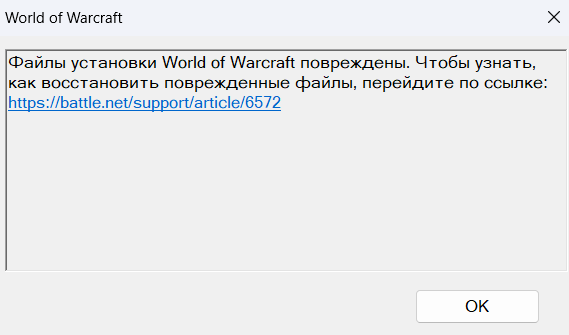
Спасибо за скриншот! Окно «Файлы установки World of Warcraft повреждены» выдаёт сам клиент игры при запуске, до подключения к серверу. Значит, причина в файлах игры на вашем компьютере, а не в сервере. По журналу раздачи видно, что полная проверка в лаунчере всё-таки нашла три испорченных архива игры (по 1 ГБ каждый) и скачала их заново.
Если ошибка повторяется, в лаунчере откройте «Настройки» → «Загрузки» → «Восстановить хранилище» → «Восстановить». Лаунчер удалит из папки Data\data индексы и архивы и скачает хранилище заново (около 103 ГБ, это займёт время). Аддоны, настройки и скриншоты при этом сохранятся.
Раз архивы испортились сами по себе, стоит проверить диск, на котором стоит игра (в Windows: свойства диска → «Сервис» → «Проверить»), и добавить папку игры в исключения антивируса.
Напишите, пожалуйста, помогло ли.
— — —
Thanks for the screenshot! The "World of Warcraft installation files are damaged" window comes from the game client itself at startup, before it connects to the server. So the cause is in the game files on your computer, not on the server. The download log shows that the full check in the launcher did find three damaged game archives (1 GB each) and downloaded them again.
If the error keeps coming back, open "Settings" > "Downloads" > "Repair game storage" > "Repair" in the launcher. The launcher will delete the indexes and archives from the Data\data folder and download the storage again (about 103 GB, this takes time). Add-ons, settings and screenshots are kept.
Since the archives got damaged on their own, it is worth checking the disk the game is installed on (in Windows: disk properties > "Tools" > "Check") and adding the game folder to your antivirus exclusions.
Please let us know whether this helped.
Если ошибка повторяется, в лаунчере откройте «Настройки» → «Загрузки» → «Восстановить хранилище» → «Восстановить». Лаунчер удалит из папки Data\data индексы и архивы и скачает хранилище заново (около 103 ГБ, это займёт время). Аддоны, настройки и скриншоты при этом сохранятся.
Раз архивы испортились сами по себе, стоит проверить диск, на котором стоит игра (в Windows: свойства диска → «Сервис» → «Проверить»), и добавить папку игры в исключения антивируса.
Напишите, пожалуйста, помогло ли.
— — —
Thanks for the screenshot! The "World of Warcraft installation files are damaged" window comes from the game client itself at startup, before it connects to the server. So the cause is in the game files on your computer, not on the server. The download log shows that the full check in the launcher did find three damaged game archives (1 GB each) and downloaded them again.
If the error keeps coming back, open "Settings" > "Downloads" > "Repair game storage" > "Repair" in the launcher. The launcher will delete the indexes and archives from the Data\data folder and download the storage again (about 103 GB, this takes time). Add-ons, settings and screenshots are kept.
Since the archives got damaged on their own, it is worth checking the disk the game is installed on (in Windows: disk properties > "Tools" > "Check") and adding the game folder to your antivirus exclusions.
Please let us know whether this helped.
Все, натестировался.
Скачал по новой. Зашел. через 3 мину все колом повисло. Ноут колом. После ребута опять клиент битый. Опять качать 100 гигов желания уже нет.
Понимаем, обидно. Посмотрели журналы: после вашего сообщения лаунчер ещё раз проверил файлы и докачал только три испорченных архива (около 3 ГБ, а не 100), и примерно через 50 минут вы снова зашли в игру. Сервер в это время работал без сбоев, других игроков не выкидывало.
Что происходит, судя по всему: ноутбук зависает целиком, и его приходится выключать кнопкой. В этот момент игра как раз пишет в свои файлы, поэтому после перезагрузки они оказываются испорчены. Сервер не может «повесить» сам компьютер — такое бывает из-за перегрева, драйвера видеокарты или проблем с диском или памятью.
Что стоит сделать:
— если клиент снова «битый», не качайте всё заново: в лаунчере «Настройки» → «Загрузки» → «Полная проверка». Она докачает только испорченные файлы (обычно несколько гигабайт);
— обновите драйвер видеокарты; в настройках игры поставьте ограничение кадров (например, 60) и понизьте качество графики — так ноутбук меньше греется;
— проверьте температуру и охлаждение ноутбука (подставка с вентиляторами, чистка от пыли);
— проверьте диск (свойства диска → «Сервис» → «Проверить») и память (Windows: «Средство проверки памяти»).
Если после этого будет выкидывать именно с сервера (окно «Соединение с сервером потеряно» при живом ноутбуке), напишите здесь — разберём.
— — —
We understand, that's frustrating. We checked the logs: after your message the launcher checked the files again and downloaded only the three damaged archives (about 3 GB, not 100), and about 50 minutes later you logged in again. The server ran without problems at that time, and no other players were disconnected.
What seems to be happening: the laptop freezes completely and has to be turned off with the power button. At that moment the game is writing to its files, so after the reboot they end up damaged. The server cannot freeze the computer itself; this usually comes from overheating, the graphics driver, or a disk or memory problem.
What to do:
- if the client is "broken" again, do not download everything again: in the launcher use "Settings" > "Downloads" > "Full check". It downloads only the damaged files (usually a few gigabytes);
- update your graphics driver; in the game settings set a frame rate limit (for example 60) and lower the graphics quality, so the laptop heats up less;
- check the laptop's temperature and cooling (a cooling pad, cleaning out dust);
- check the disk (disk properties > "Tools" > "Check") and the memory (Windows Memory Diagnostic).
If after that you get disconnected from the server itself (the "Disconnected from server" window while the laptop keeps working), please post here and we will look into it.
Что происходит, судя по всему: ноутбук зависает целиком, и его приходится выключать кнопкой. В этот момент игра как раз пишет в свои файлы, поэтому после перезагрузки они оказываются испорчены. Сервер не может «повесить» сам компьютер — такое бывает из-за перегрева, драйвера видеокарты или проблем с диском или памятью.
Что стоит сделать:
— если клиент снова «битый», не качайте всё заново: в лаунчере «Настройки» → «Загрузки» → «Полная проверка». Она докачает только испорченные файлы (обычно несколько гигабайт);
— обновите драйвер видеокарты; в настройках игры поставьте ограничение кадров (например, 60) и понизьте качество графики — так ноутбук меньше греется;
— проверьте температуру и охлаждение ноутбука (подставка с вентиляторами, чистка от пыли);
— проверьте диск (свойства диска → «Сервис» → «Проверить») и память (Windows: «Средство проверки памяти»).
Если после этого будет выкидывать именно с сервера (окно «Соединение с сервером потеряно» при живом ноутбуке), напишите здесь — разберём.
— — —
We understand, that's frustrating. We checked the logs: after your message the launcher checked the files again and downloaded only the three damaged archives (about 3 GB, not 100), and about 50 minutes later you logged in again. The server ran without problems at that time, and no other players were disconnected.
What seems to be happening: the laptop freezes completely and has to be turned off with the power button. At that moment the game is writing to its files, so after the reboot they end up damaged. The server cannot freeze the computer itself; this usually comes from overheating, the graphics driver, or a disk or memory problem.
What to do:
- if the client is "broken" again, do not download everything again: in the launcher use "Settings" > "Downloads" > "Full check". It downloads only the damaged files (usually a few gigabytes);
- update your graphics driver; in the game settings set a frame rate limit (for example 60) and lower the graphics quality, so the laptop heats up less;
- check the laptop's temperature and cooling (a cooling pad, cleaning out dust);
- check the disk (disk properties > "Tools" > "Check") and the memory (Windows Memory Diagnostic).
If after that you get disconnected from the server itself (the "Disconnected from server" window while the laptop keeps working), please post here and we will look into it.
CASCRepair.mrk
Просто тут оставлю. Что б не заставляли народ перекачивать клиент )
Разобрался сам с проблемой
Просто тут оставлю. Что б не заставляли народ перекачивать клиент )
Разобрался сам с проблемой
Спасибо, что поделились решением с файлом CASCRepair.mrk! Рады, что всё заработало, — это пригодится и другим игрокам. Если вылеты вернутся, напишите в этой теме.
— — —
Thanks for sharing your solution with the CASCRepair.mrk file! We are glad it works now, and this will help other players too. If the disconnects come back, please post in this thread.
— — —
Thanks for sharing your solution with the CASCRepair.mrk file! We are glad it works now, and this will help other players too. If the disconnects come back, please post in this thread.
The topic is closed — no new replies are accepted.